Pathology lab software · India

Pathology lab software for Indian labs — offline, NABL-ready

SamLab runs a pathology lab from the front desk to the signed report: registration, GST and UPI billing, barcoded samples, results straight off 330+ analyzer models, NABL-format reports and the accounts behind them. The database sits on your own PC, so the counter keeps working through every outage. One-time licence from ₹2,999.

  • Offline-first
  • One-time from ₹2,999
  • 330+ analyzer models
  • NABL-format reports
  • 7-day trial · no card
  • Support in Hindi & English

What is pathology lab software?

Pathology lab software runs a diagnostic laboratory from registration to signed report: it bills the patient, barcodes the sample, receives results from analyzers, holds them until a pathologist verifies them, then prints or sends the report. SamLab keeps that whole chain in a database on the lab’s own computer, so it carries on working when the internet drops.

Four questions separate one product from another.

Ask every vendor the same four — here is where SamLab answers each one.

Does it keep working when the internet drops?

Cloud-only software stops at the counter until the connection returns. SamLab runs every screen from a database on your own PC.

What works offline

Will it talk to the analyzers you already own?

330+ analyzer models over ASTM and HL7, each result matched to its sample by barcode. Check yours by make and model.

Check your analyzer

Will its reports satisfy your assessor?

NABL templates with the accreditation strip, a ULR, verifier identity, units and ranges. Accreditation is granted to your laboratory, never to software.

What NABL asks for

What does it cost over three years, not just month one?

Pro costs ₹15,997 over its first three years, licence and AMC included. Every plan is in the table below.

See the price table
Module tour

Every module a pathology lab runs on, in one application

15 modules from the front desk to the ledger. Each card says what the module does, which plan carries it, and where to read more.

At the front desk

Registration, billing and the sample label — the screens a receptionist lives in all day.

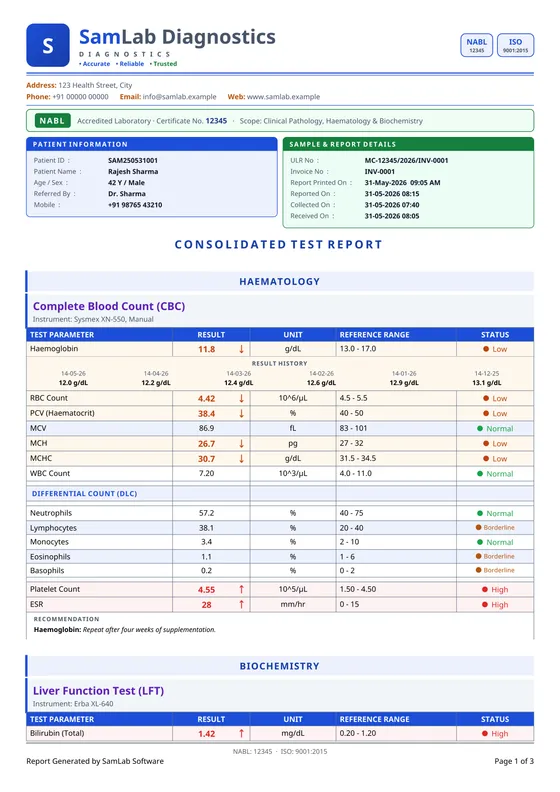
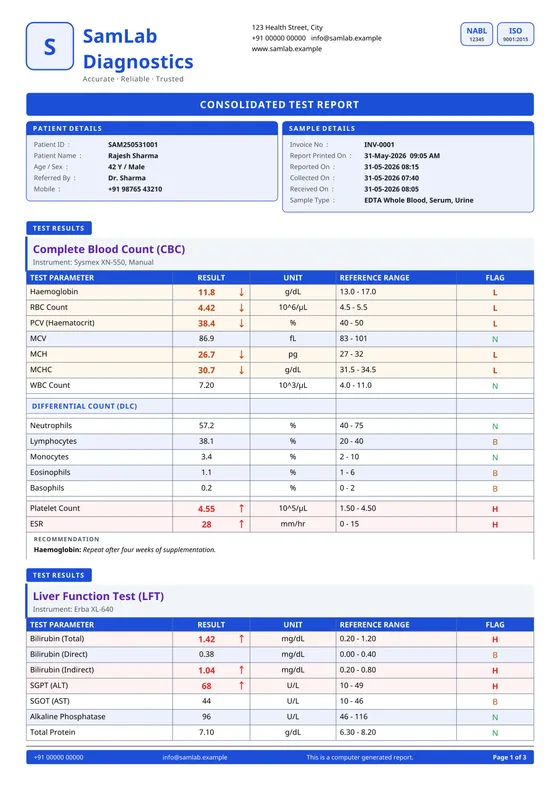
Drawn from SamLab’s own screens: a bill raised from the Frontdesk menu, a CBC entered and verified in Result Entry, and the finished report sent to the patient.

Patient registration

Every plan

Register a walk-in from the billing screen itself, or from the patient register. Each patient gets a SamLab ID — a prefix you choose and a six-digit serial — and is found again by name or mobile number. Fields your lab never fills can be switched off, so the operator tabs through only the ones you use.

Billing, GST invoices and UPI

Every plan

Pick the patient and the referring doctor, add tests or packages, press Alt+S, and the invoice and receipt are generated together. One bill can be split across cash, UPI, bank and credit; a part payment becomes a due you collect later without overwriting the first receipt. Discounts go in as rupees or a percentage, bill numbers can restart daily or monthly, and GST-ready invoices carry your GSTIN. The invoice number is allocated on your own PC, so bills are raised and printed with the internet down.

Sample collection and barcodes

Every plan

The receipt and the barcode labels print from the same save, and the sample is collected against that invoice. From then on the barcode is the key: scan it in Result Entry and every billed test appears at once, manual tests on top and analyzer tests below.

Home collection

Bill a home visit as its own visit type and add the trip in the Collection Charges field, directly below Discount. The patient pays it, but it never enters the referring doctor’s commission. Home rates sit beside your standard and B2B rates in the bulk rate editor, which sets every item’s price in one spreadsheet-style grid.

At the bench

From the tube to the signed report, without anyone retyping a value.

One result’s path: the analyzer sends it, Result Entry matches it by barcode, the pathologist approves it, and the report reaches the patient.

Result entry and verification

Every plan

Each result is entered the way its test needs — numeric, qualitative, titre, text or calculated — and flagged H, L, HH or LL against age- and gender-aware reference ranges as you type. A critically abnormal value asks for confirmation before you leave the field, so a misplaced decimal is caught at the bench instead of on the patient’s report. Once a report is dispatched, a result changes only in Amend Mode, with a reason, and every version is kept with who entered it and when.

Analyzer interfacing (LIS)

Pro and above

Add the analyzer and SamLab detects whether it speaks ASTM or HL7, over a serial port or the network. Most test codes map themselves; you map the rest once. Each result lands in Result Entry against the right sample by barcode, tagged ANALYZER, and anything that cannot be matched waits in the LIS inbox instead of being lost. Results travel one way, from the instrument into SamLab. 330+ models are supported — Sysmex, Mindray, Erba Mannheim, Agappe, Roche, Beckman Coulter, Abbott and more — and IQC with Levey-Jennings charts and Westgard rules comes with the analyzer add-on. The first analyzer is free; each one after that is ₹5,000.

Report designs and NABL formats

NABL templates on every plan · designer on Pro and above

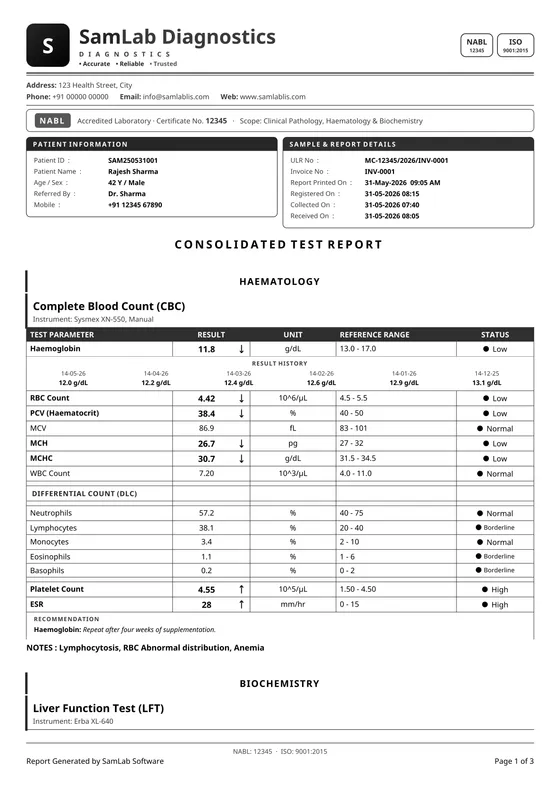
20 built-in report designs, each carrying your letterhead, logo, signatures, accent colour and printed language. Black & white mode prints clean lines instead of grey blocks, so flagged values stay readable on a mono laser printer. Every report carries a QR and a Code-128 barcode. The NABL templates add the accreditation strip and a ULR built from your NABL number, the year and the invoice number — and print no ULR at all if the NABL number is blank. A custom design matched to the report you already print is ₹1,000 + 18% GST.

Report delivery*

E-mail and WhatsApp link on every plan · WhatsApp Business on Pro and above

A verified report opens as a PDF inside SamLab, so you can check it before it prints, then goes to paper, by e-mail or on WhatsApp. From the report or receipt preview, Send email sends the PDF from the lab’s own Gmail or Google Workspace address, with the lab’s name as the sender — one report at a time, on every plan, with no automatic or bulk e-mail. On every plan, the report preview opens the lab’s own WhatsApp — the desktop app or WhatsApp Web — with a link to the report, and the operator presses Send. On Pro and above, a lab can connect its own WhatsApp Business account so reports go out by themselves with the PDF attached. Those messages are charged per message, and attaching the PDF needs an active cloud plan, because the PDF is served from SamLab’s storage.

In the back office

The money side of a lab — referrers, partners, ledgers and branches.

Doctor referrals and payouts

Pro and above

Every bill is tied to its referring doctor, and the payout is calculated from the billed tests at per-doctor, per-test rates you set. Statements come from the doctor ledger instead of a notebook, collection charges never count towards commission, and because payouts flow into accounts and MIS you see profit per doctor, not just referral counts.

B2B, corporate and outsourced tests

Pro and above

Raise corporate and B2B bills against a party at agreed rates that apply on their own, and settle them later through the party ledger, with a running statement for each client. For tests you send out, SamLab handles dispatch manifests and result intake — passed through, recorded only, or merged into your own report — and tracks the margin on every outsourced test.

Accounts, bank reconciliation and MIS

Pro and above

The day-book, ledgers and expenses fill from the counter, and the bill, patient, corporate and party registers all read the same data — so the receptionist and the accountant see identical numbers without an export. Bank reconciliation reads statements with presets for HDFC, ICICI, State Bank of India, Kotak Mahindra and Axis, and MIS dashboards break revenue down by test and by referrer.

Branches and collection centres

Executive and above

Each branch runs on its own database and keeps working through its own outages; cloud sync joins them up when the line is there, with per-branch accounting and an MIS roll-up for head office. Several PCs inside one building do not need the cloud at all: the LAN data node shares one live database over the local network, instantly and with no internet.

Across the lab

The pieces every screen depends on.

ABDM, ABHA and RGHS

Every plan

On every plan, SamLab captures the patient’s ABHA and builds a FHIR R4 document bundle from each verified report — LOINC-coded where the test has a code — for the patient’s ABDM health record. Live ABDM delivery switches on once your lab completes ABDM onboarding with SamLab; until then it runs only against the ABDM sandbox. The RGHS upload, for labs empanelled under the Rajasthan scheme, sits alongside it, and both work inside ordinary registration and reporting rather than as a separate task.

SamLab AI*

Pro and above

Three jobs: a plain-language explanation of each report in English, Hindi or Hinglish that your pathologist approves before it reaches the patient; search by description — “unpaid bills from last week” — instead of hunting for the right screen; and prescription scanning that reads a doctor’s handwriting into a draft bill. Clinical values are never AI-generated, and no patient name or ID leaves the lab. It is free up to 100 requests a day per lab, as an introductory offer.

Users, permissions and backups

Every plan

Each person signs in with their own login, and every menu opens separately for View, Add, Edit and Delete — so a receptionist can raise a bill without being able to delete one. Logins, permission changes, deletions and amended results go to an activity trail. Backups run daily by default to a folder you choose and, once you connect it, to your own Google Drive; SamLab keeps no copy.

* Cloud & AI features — charges apply, from ₹999/year.
Offline-first

What keeps working when the internet goes down

Watch the Billing screen lose its connection, keep saving bills to the local database, and sync every one of them the moment the line is back.

Works with the internet unplugged

  • Patient registration, search and history
  • Billing and receipts — the invoice number is allocated on your own PC
  • Sample collection and barcode printing
  • Result entry, and results from analyzers on the local network
  • Report printing and PDF export
  • Day-book, expenses and accounts
  • Staff sign-in on a PC that has been activated
  • Several PCs in one building, through the LAN data node

Needs a connection

  • Activating the licence, once — a phone hotspot for a few minutes is enough
  • An occasional licence check, which SamLab warns you about days in advance
  • Cloud sync between sites, cloud backup and SamLab AI
  • Sending a report on WhatsApp, by e-mail or by link

Offline-first is a design decision, not a fallback mode. The application and its database live on the lab’s PC, so the network is optional: an ISP outage, a dead hotspot or a cut cable stops nothing at the counter. Bills saved while the line is down queue up and sync themselves when it returns, and nobody re-enters anything.

It is not the same thing as an old desktop package either. Those kept working offline too, but stranded the data on one PC with backups somebody had to remember to take. SamLab adds cloud sync, branch roll-ups and automatic backup as layers on top of the local database rather than underneath it — the reliability of a desktop system with the reach of the cloud, instead of a choice between them.

Why offline-first matters for an Indian lab
Pricing

Pathology lab software price: pay once, not every month

Every plan price is public. Buy the licence once — from ₹2,999 — with the first year of AMC included, and see exactly what the first three years cost before you start.

SamLab plans for Indian labs — one-time licence price, AMC, limits and features
PlanExpress₹2,999one-time + 18% GSTPro₹9,999one-time + 18% GSTExecutive₹14,999one-time + 18% GST
AMC from year 2 (year 1 included)₹1,499/year₹2,999/year₹3,999 with the mobile app add-on₹4,999/year₹5,999 with the mobile app add-on
Desktops and logins1 desktop · 3 logins2 desktops · 5 logins5 desktops · 10 logins
EditionsDesktop or WebDesktop + web dashboard · mobile app add-on optional (needs SamLab Cloud)Desktop + web dashboard · mobile app add-on optional (needs SamLab Cloud)
Analyzer (LIS) interfacingNot included — results are typed inThe first analyzer is free, then ₹5,000 eachThe first analyzer is free, then ₹5,000 each
Cloud sync and backupLocal and Google Drive backupOptional, from ₹999/year*Optional, from ₹999/year*
First three years, licence + AMC₹5,997₹15,997₹24,997
Offline-first desktop appIncludedIncludedIncluded
Patients, Billing, GST, UPIIncludedIncludedIncluded
Receipts, Barcode, ReportsIncludedIncludedIncluded
NABL report templatesIncludedIncludedIncluded
ABDM / FHIR & RGHS uploadIncludedIncludedIncluded
Drive & local backupIncludedIncludedIncluded
SamLab AI suite*Not includedIncludedIncluded
LIS analyzer integration — 1 analyzer free, then ₹5,000/analyzerNot includedIncludedIncluded
B2B & special ratesNot includedIncludedIncluded
Accounting & bank reconciliationNot includedIncludedIncluded
Referral commission trackingNot includedIncludedIncluded
Report designerNot includedIncludedIncluded
Cloud sync & MIS reports*Not includedIncludedIncluded
Cloud backup*Not includedIncludedIncluded
WhatsApp report delivery*Not includedIncludedIncluded
Multi-branchNot includedNot includedIncluded
Branch accounting & MISNot includedNot includedIncluded
* Cloud & AI features — charges apply, from ₹999/year.

Enterprise — quoted per lab

For larger chains: up to 10 desktops and 25 logins, with everything in Executive plus:

  • Payment gateway & auto-UPI
  • API seeding
  • Patient mobile app
  • Priority support & onboarding
Ask for an Enterprise quote

The licence is bought once

The first year of AMC is included. From year 2 the AMC keeps updates and priority support coming. It is optional: skip it and the software keeps running — you simply stop receiving updates.

Cloud is separate, and optional*

Cloud sync, cloud backup and SamLab AI run on our servers, so they are billed on their own — from ₹999 a year, on Pro and above. Everything that runs on your PC is covered by the licence, and if cloud is ever switched off the app and its data carry on as before.

No setup fee

There is no onboarding or setup fee for the software. The Mobile app add-on (iPhone & Android) on Pro and Executive adds ₹1,000 in year 1 and is folded into a higher AMC after that; it needs SamLab Cloud.

Prices are exclusive of GST. 18% GST is added at checkout and shown as a separate line.

Product tour · 12 min

Dekhiye SamLab chalta hua — patient se report tak

Ek patient register kijiye, bill banaiye, result daaliye aur report print kijiye — poora din ek hi screen se, Hindi me samjhaya hua.

Jump to:

Should an Indian pathology lab choose offline or cloud software?

For most Indian labs, offline-first. Cloud-only software stops billing and reporting when the connection drops; offline-only software strands the data on a single PC. SamLab keeps the database on the lab’s own computer and adds cloud sync on top, so the counter never waits for the network and a second site can still see the data.

Comparison

Cloud software stops when the line drops. Offline software stops at one PC. SamLab is neither.

A local database that keeps every screen working through an outage, and a cloud copy the moment the connection is back. Here is what that means row by row.

FeatureSamLab (offline-first + cloud)Cloud-only softwareOffline-only software
Works during an internet outageEvery screen — billing, results, reports, barcodesStops until the connection returnsYes
Reach it from a second site or a phoneCloud sync and the web dashboardYesOne PC only
BackupDaily local backups, your own Google Drive, and a cloud copy on Google CloudCloud copy only — nothing on your premisesManual, if anyone remembers
Analyzer integrationSerial and network, matched by barcode into Result EntryUsually through a separate local bridge programVaries by product
Report deliveryA WhatsApp link from the lab’s own number, or the PDF from its own GmailYesPrint and hand over
Speed at the counterLocal database — no round trip per keystrokeAs fast as the connection that dayFast
How you payOne-time licence; cloud sync is optionalMonthly, per user or per centre, for everOne-time
UpdatesAutomatic, and the lab can pause themAutomaticReinstall, or pay for the next version
NABL-ready report designerLetterheads, formats, languages, signaturesFixed templatesLimited
Multiple branches and B2B clientsBranch activities, collection centres, B2B rate listsYesNot built for it
Who holds your dataYou — the database is on your PC and exportableThe vendor’s serversYou
Payments (UPI) recorded in the billYes, with the receiptYesCash book, usually
AI explanations on the reportSamLab AI — approved by your pathologist before it printsSome productsNo

“Cloud-only” and “offline-only” describe categories, not any named product. Where a category does something well, the row says so.

Before you sign with anyone

Offline-first has trade-offs too. These are the ones worth knowing first.

  • Reaching the lab’s data from home or a second site needs cloud sync, which is billed separately. On its own, the local database serves one building.
  • The PC that holds the database matters. Keep a backup off it — a copy on the same disk dies with the disk.
  • Activation and an occasional licence check need a connection: minutes on a phone hotspot, not a permanent line.
  • Judge named vendors on what they publish. Every SamLab comparison quotes the other vendor’s own website and dates the check.
Every vendor comparison, with sources and dates
Who it’s for

Pick the plan by the lab you run

The difference between plans is analyzers, branches and back office — not whether the basics work. Every plan runs offline and prints NABL-format reports.

Single-counter pathology labs

Express

Express covers registration, billing, barcodes, reports, NABL templates, ABDM and backup on 1 desktop with 3 logins, for ₹2,999 once. If an analyzer runs every day, start at Pro instead — on Express, results are typed in.

Lab software for small labs

Growing labs with analyzers

Pro

Pro adds analyzer interfacing with the first analyzer free, the report designer, referral payouts, B2B rates, accounting and MIS, across 2 desktops and 5 logins, for ₹9,999.

Analyzer interfacing

Diagnostic centres with branches

Executive

Executive adds multi-branch with per-branch accounting and an MIS roll-up across 5 desktops and 10 logins, for ₹14,999. Collection centres keep billing through their own outages and sync when the line is back.

Multi-branch lab software

Hospital laboratories

OPD and IPD visit types sit on the billing screen, HL7 (ORM) orders from a hospital HIS can be reviewed and posted as a bill in one click, and X-ray, USG, CT, MRI and ECG reports are written in the same system. HL7 and radiology are licensed modules, so confirm both on your quote.

Clinical and LIS features

Labs switching from other software

There is no import wizard, and we say so. You export your data to Excel or CSV; we map, clean and load it, then run in parallel with you before go-live. Your patient list moves across, and new registrations continue your old numbering series.

How migration works
Questions labs ask

Pathology lab software, answered

How much does pathology lab software cost in India?

SamLab is a one-time licence: Express is ₹2,999, Pro ₹9,999 and Executive ₹14,999, and Enterprise is quoted per lab. The first year of AMC is included; from year 2 it is ₹1,499 to ₹4,999 a year depending on the plan. Analyzer interfacing is on Pro and above: the first analyzer is free and each one after that is ₹5,000. Cloud sync, cloud backup and SamLab AI are optional and billed separately. Prices are exclusive of GST. 18% GST is added at checkout and shown as a separate line.

Does SamLab work without internet?

Yes. The database is on the lab’s own PC, so registration, billing, barcodes, result entry, analyzer results on the local network and report printing all work with the internet unplugged, and bills saved during an outage sync themselves when the line returns. The internet is needed once to activate the licence, for an occasional licence check, for the cloud features — sync between sites, cloud backup and SamLab AI — and to send a report by WhatsApp or e-mail.

Is SamLab NABL certified?

No, and no software can be: NABL accredits laboratories, never software. What SamLab supplies is the evidence an assessor asks to see — NABL report templates on every plan with the accreditation strip and a ULR, barcoded sample traceability, a result revision history with amendment reasons, and IQC with Levey-Jennings charts and Westgard rules on Pro and Enterprise, and with the analyzer add-on. Some NABL 112A requirements, such as EQAS records, sit outside SamLab entirely.

Which analyzers can SamLab connect to?

330+ analyzer models across haematology, biochemistry, immunoassay, urine, coagulation and electrolyte benches — Sysmex, Mindray, Erba Mannheim, Agappe, Roche, Beckman Coulter, Abbott, Horiba, Siemens Healthineers and more — over serial or network, using ASTM or HL7. Results flow one way, from the instrument into Result Entry. An analyzer missing from the list is added at no charge. Interfacing is on Pro and above; the first analyzer is free and each one after that is ₹5,000.

Is patient data safe, and how is it backed up?

Patient records live in a database file on your own PC, and nothing leaves the building unless you switch cloud sync on. Every user has their own login and per-menu permissions, every change to a result is kept with who made it and why, and backups run daily by default to a folder you choose and, if you connect it, your own Google Drive. Keep at least one backup off the lab PC.

Can I move my data from my current lab software?

Yes, as a hands-on service rather than an import wizard. You export your patients, rate list and doctors to Excel or CSV; we map, clean and load them before go-live, then run in parallel with you. SamLab issues its own patient IDs but continues your old numbering series, and old report PDFs can be attached to the patient. There is no setup fee for the software; the migration is quoted once we have seen your file.

Does SamLab run on Windows, on a phone or in a browser?

SamLab is a Windows desktop application for Windows 10 or 11, and the PC it runs on holds the database. Express is sold as either the desktop or the web edition. Pro and Executive include the desktop app and the web dashboard, with the optional Mobile app add-on (iPhone & Android) at ₹1,000 for the first year, folded into the AMC after that. The mobile app add-on needs SamLab Cloud, because the app works on the lab’s synced data.

How many computers and users does a licence cover?

Express covers 1 desktop and 3 logins, Pro 2 desktops and 5, Executive 5 desktops and 10, and Enterprise 10 desktops and 25. Several PCs in one building share a single live database over the LAN data node, with no internet needed. Seats count active logins, so deactivating someone who has left frees a seat without losing their bills.

When can I reach SamLab support?

Mon–Sat, 9:30 AM – 10:00 PM IST, in Hindi and English, on +91 98284 00519 or support@samlab.in. Support works from Kota, Rajasthan, where SamLab is built. Inside the software, F1 opens the user guide in English or Hindi, and every feature listed in Settings links to its own help topic.

Is there a free trial?

Yes. The 7-day trial runs the complete software on your own PC with every feature unlocked — no card and no sales call first. A trial install uploads nothing, so you can register real patients and print real reports. When the seven days end, SamLab asks for a licence and your data stays on the PC.

Can SamLab run a lab with several branches?

Yes, from Executive (₹14,999 one-time): 5 desktops, 10 logins, and multi-branch with per-branch accounting and an MIS roll-up. Each branch keeps working offline and syncs when connected, so a collection centre on a weak line never stops; the cloud sync and backup that join the branches are billed separately. Enterprise is for larger chains and is quoted per lab.

Across India

Pathology lab software in your city

Local pages for diagnostic and pathology labs — the connectivity, the referral networks and the support each city actually has.

SamLab is not restricted by city: installation, training and support are delivered remotely, with on-site visits arranged where distance allows. The software is the same everywhere — these pages exist because local buyers ask about local conditions.

Also see our regional hub for lab software in Rajasthan.

7-day free trial · no card

Try the whole lab, free for 7 days.

No card. No catch. Run SamLab on your own data — online or offline — and feel the difference before you pay a rupee.